Transcript
00:22Hi, I'm David Kis sales engineer with complete hypert TRS.
00:25Today, I'm back with the 5250 series portable primary cable fault locator to demonstrate how
00:31to operate the unit in advance mode. Before we begin,
00:34we'd like to stress the importance of safety. Please use the appropriate personal protective
00:37equipment when testing with high voltage. Also, please follow the particular safety
00:41guidelines as outlined by your company. If you have not operated the 5250 in basic mode,
00:46I recommend following the link below to our 5250 basic mode demonstration before
00:53initiating any test. Make sure to check your connections to the
00:57ground, high voltage and return leads.
01:04Let's start by powering on the 50 to 50 first. Let's switch the power on.
01:10And next, we'll make sure that the unit is in TDR mode and then we'll open up the TDR case
01:16and then power on the TDR.
01:21Once the TDR is powered on, we can begin operating the unit in advanced mode.
01:26First press advanced mode.
01:30If your 5250 is password protected, enter the password, if not press.
01:34Ok. Next, the TDR will display the advanced mode
01:39menu options from left to right. We have measure memory setup,
01:44adjust configure and basic mode.
01:48Pressing basic mode will take you back to the basic mode menu to start the cable fault
01:54locating sequence. In advanced mode, we want to start by pressing
01:58measure upon pressing measure a new set of options will be displayed upon the bottom of
02:03the TDR. From left to right.
02:05We have sample zoom position, cursors TDR and main menu to get back to
02:12the advanced mode, main menu to start the test. We'll hit sample.
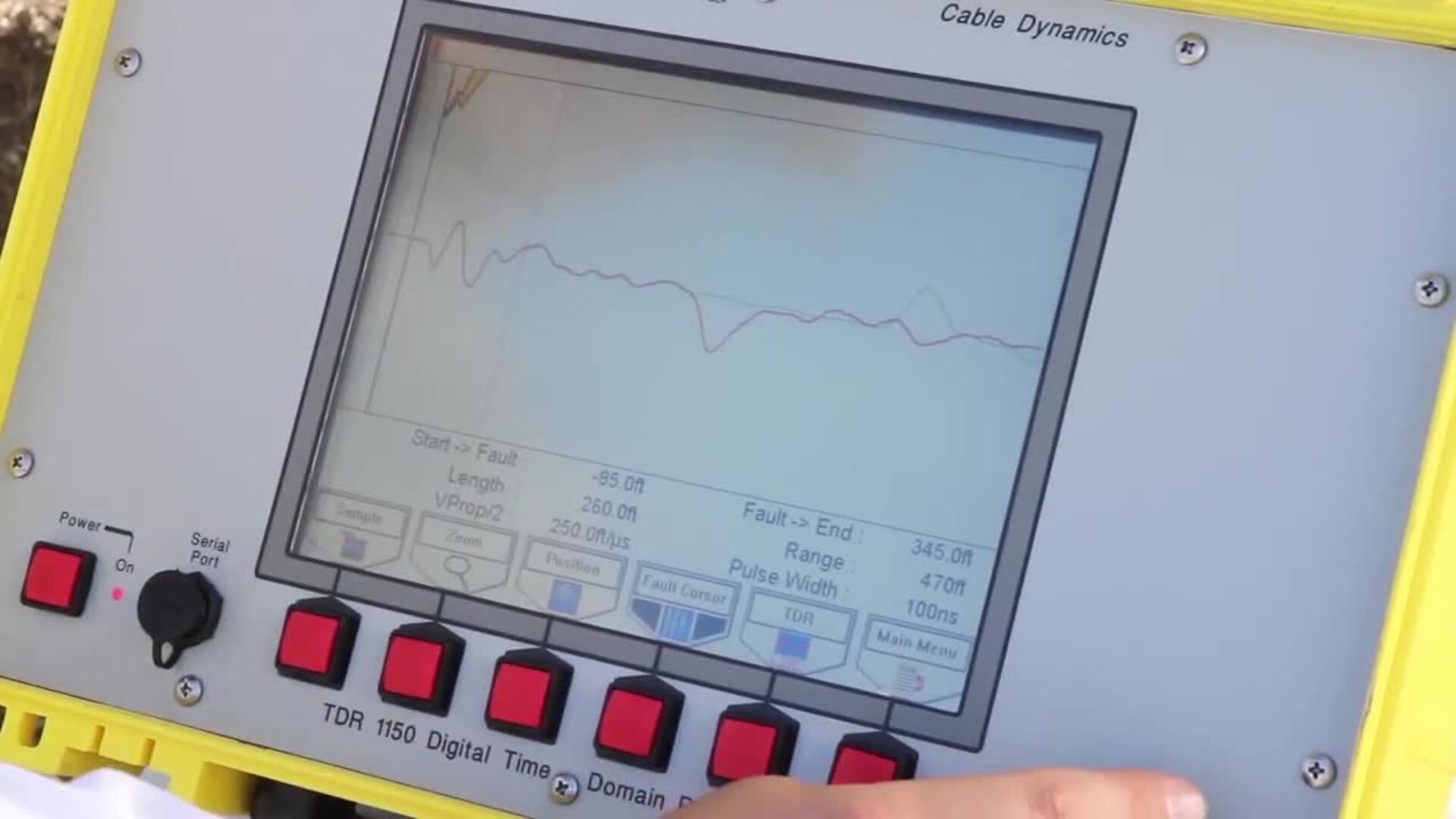
02:17We'll also notice that our TDR is selected as well, meaning it will send a low voltage
02:22impulse through the cable seeking impedance changes and it will display those particular
02:26impedance changes on the screen.
02:31Unlike in basic mode, in advanced mode, you'll have to adjust the cursors such as the N cursor
02:36and the fault cursor manually.
02:39So we'll hit cursor, we will not want to touch the start cursor as we had set up the hookup
02:44point. Previously, we do not want to adjust that.
02:47So we'll hit the button again, adjust the end cursor and throw it out using the red rotary
02:51knob to where the green line, which indicates the low voltage TDR,
02:56where the positive inflection which signifies and open.
03:02And we'll throw that out toward the beginning of that because that will signify the end of
03:05our c the length of our cable run which is displayed on the screen here and under length.
03:12Next, we'll press TDR which will give us a new set of options for the for the cable fault
03:18locating test sequence.
03:20Next is arc reflection.
03:22Arc reflection will send a high voltage impulse through the cable and it will show a red line
03:27on the screen and it will signify where the short is or the cable fault on the particular
03:33cable path. So once we are in arc reflection,
03:38we'll press capture.
03:42Now we can, our high voltage options will be displayed on the screen here,
03:46fire auto fire high pot off and main menu to go back to the,
03:52to the measure sample. At this point, we can adjust our test voltage
03:56either up or down in 500 volt increments.
03:58So we'll test that six KV.
04:01And again, we're in arc reflection. So we want one impulse through the cable,
04:06we'll press fire, the unit will begin charging and then it will discharge once it reaches the
04:11voltage. And as described, we'll see a red line
04:15signifying the high voltage impulse through the cable.
04:18And we'll also notice that there is a negative inflection which will signify a short on the
04:24particular cable path on the CD R.
04:26So we'll hit main menu to go back to our measurement options.
04:31We'll adjust our cursors again. We've already set the start cursor with the
04:37hookup point and we've also set the end cursor when we did the low voltage CD R.
04:43So now we'll set the fault cursor which is signified with a black line and a lightning
04:48bolt. So we'll scroll that out using the red rotary
04:51knob to the beginning of the negative inflection.
04:56That will be approximately where our cable fault is at 125 ft.
05:02The TDR will display the distance from the start of the cable and also from the end of
05:08that particular cable as well.
05:11Other options that you can do in this particular mode,
05:14you can zoom in on the cable in the X which will shrink it down or expand
05:21it. You can also press zoom again which allow you
05:26to zoom in and out in the Y direction and increase the size of the trace.
05:36We can also delete the trace as well by pressing, delete.
05:42You won't want to do that right now.
05:45So we'll go back to a reflection and at this point, we'll begin listening for the fall.
05:51So we hit capture, we can test our s our test voltage, we'll keep it,
05:57we'll go to seven KB this time.
05:59And now to put the unit into cycle mode where it will automatically discharge or charge and
06:05discharge competitively, we'll press auto fire.
06:09Now, the unit will begin charging and discharging.
06:12And at this point, the other member of the troubleshooting team will be listening for the
06:15fault while one user is operating the 5250 unit, the test can be stopped by hitting off
06:24and it can also be restarted again. By hitting auto fire
06:33and we can also manually stop the high voltage by engaging the emergency stop on the unit.
06:43Now, I will give you an overview of some of the basic settings and configurations that can be
06:47made to the 5250.
06:50By pressing configure mode, you can go into the configurations that can be adjusted such as the
06:55time and date length of units, whether it's feet or meters or yards.
06:59The setup mode for when the TDR starts in either basic mode or advanced mode,
07:04the shots per measurement should be one.
07:06The thumper type can be selected as well.
07:10Language would be English.
07:12The remaining configurations do not have to be changed if they do happen to be changed,
07:16they can be reset by pressing defaults which will reload the pre installed factory defaults.
07:22Next are the settings in the setup menu.
07:25First is test type, it's either single phase or three phase.
07:29Next is velocity of propagation which is preset at 250 ft per microseconds and can be
07:35adjusted depending on the type of cable sample rate.
07:38Adjust the speed of capture of the measurement system and should be preset at 100 MHZ.
07:44Pulse width allows the user to select the pulse width to be used on the system for measuring
07:49the fault position. Averaging sets how many data captures are
07:52performed for each trace drawing.
07:54This is normally set to one trigger delay sets, how long the data capture system waits in arc
07:59reflect mode after the Thumper has been fired before starting the data acquisition process
08:04background allows the color scheme used by the system to be set.
08:07It is either black or white.
08:11And then next, we can go to memory where we can store the traces that we did using the
08:18TDR. We can also delete them, move them around,
08:22recall them to pull them up and display them on the screen and scroll through each particular
08:27um trace that has been stored on the TDR to recap, connect the 5250 to the
08:34cable under test. Next, power on capacitive discharge
08:41portion of the unit and power on the TDR, initiate the cable fault pre locating test
08:48sequence by pressing measure.
08:55Begin listening for the thump at the TD R's predetermined distance and finally
09:02power off the 5250 unearth the cable to repair the cable.
09:08Now that concludes the demonstration for how to operate the 5250 in advance mode.
09:13Please visit our website for more videos and to download data sheets or for more information,
09:18please contact, contact us at the number below.
09:21Thank you for watching.

Hipotronics 5250 Advanced Mode How-To Video
- private